One place to run
your company's real estate.
Every lease, site and cost in one live picture. Every change followed from goal to proven result.
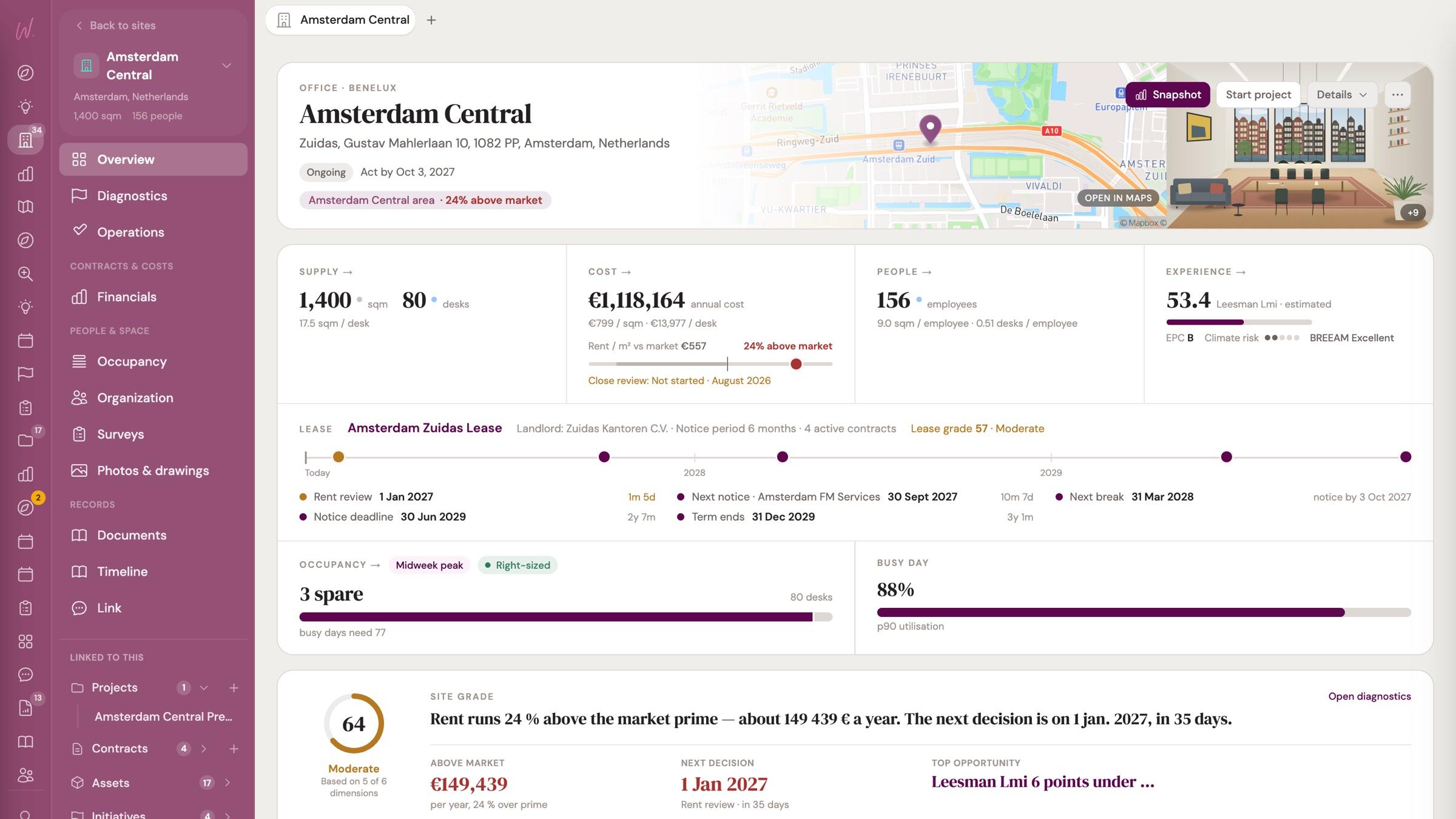
One site's page, on an example company.


Four pillars, one way round
Workplacer Know is the base. Workplacer Improve, Control and Report & Ask stand on it, and each hands something to the next.
Everything starts from the site
A site is where the estate comes together. Its leases, its costs, the people based there, how the space is used and what the market around it charges are tied to the same record, so the whole estate can be read on one map and each site on one page.
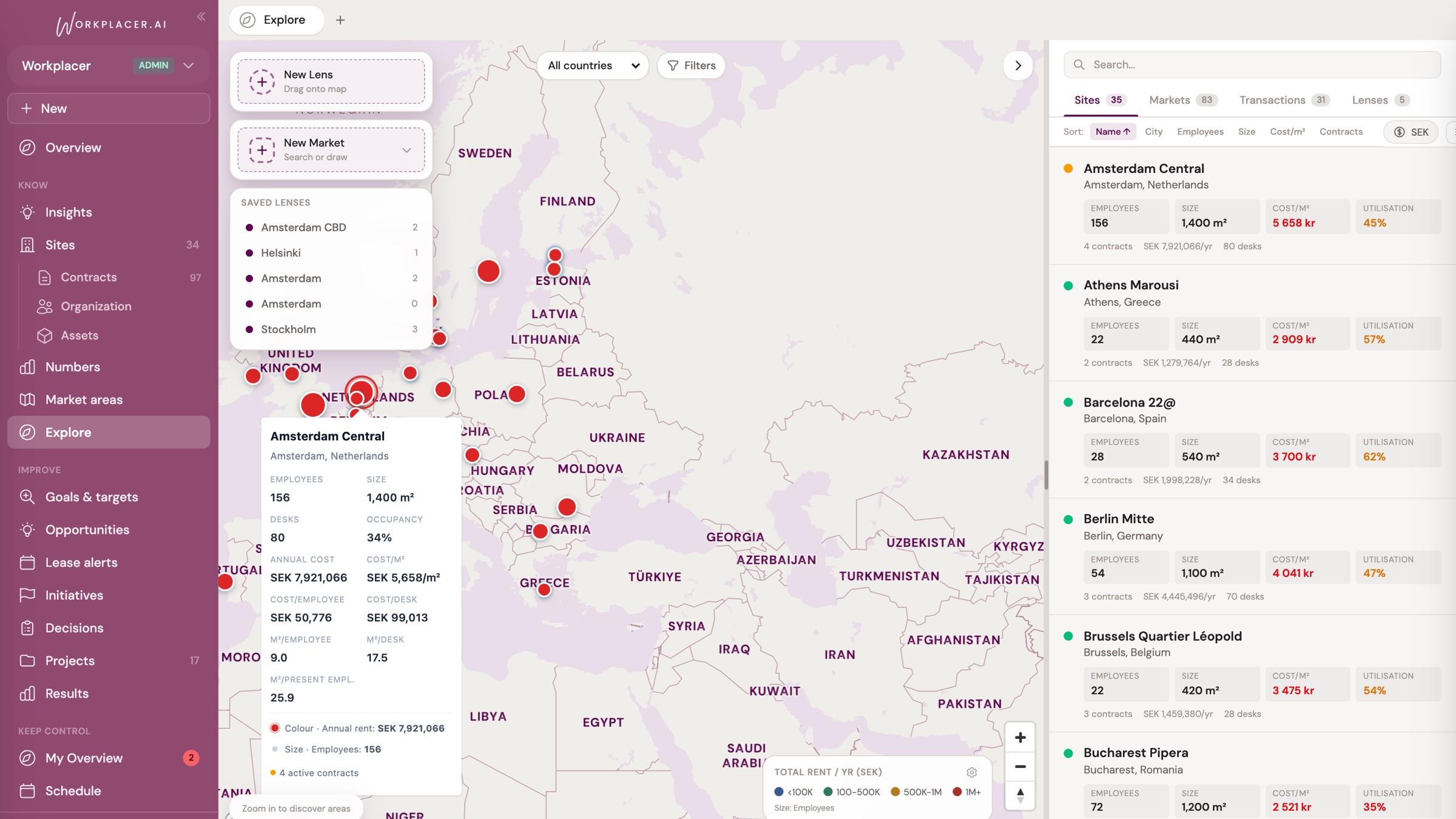
Explore: the estate on a map, on an example company.
A contract is not a file. It is a record that keeps moving.
A lease is read once and then lived with for years. Workplacer keeps the whole term on one timeline: what it costs month by month, what it will cost if it rolls on, and every option, penalty and date along the way.
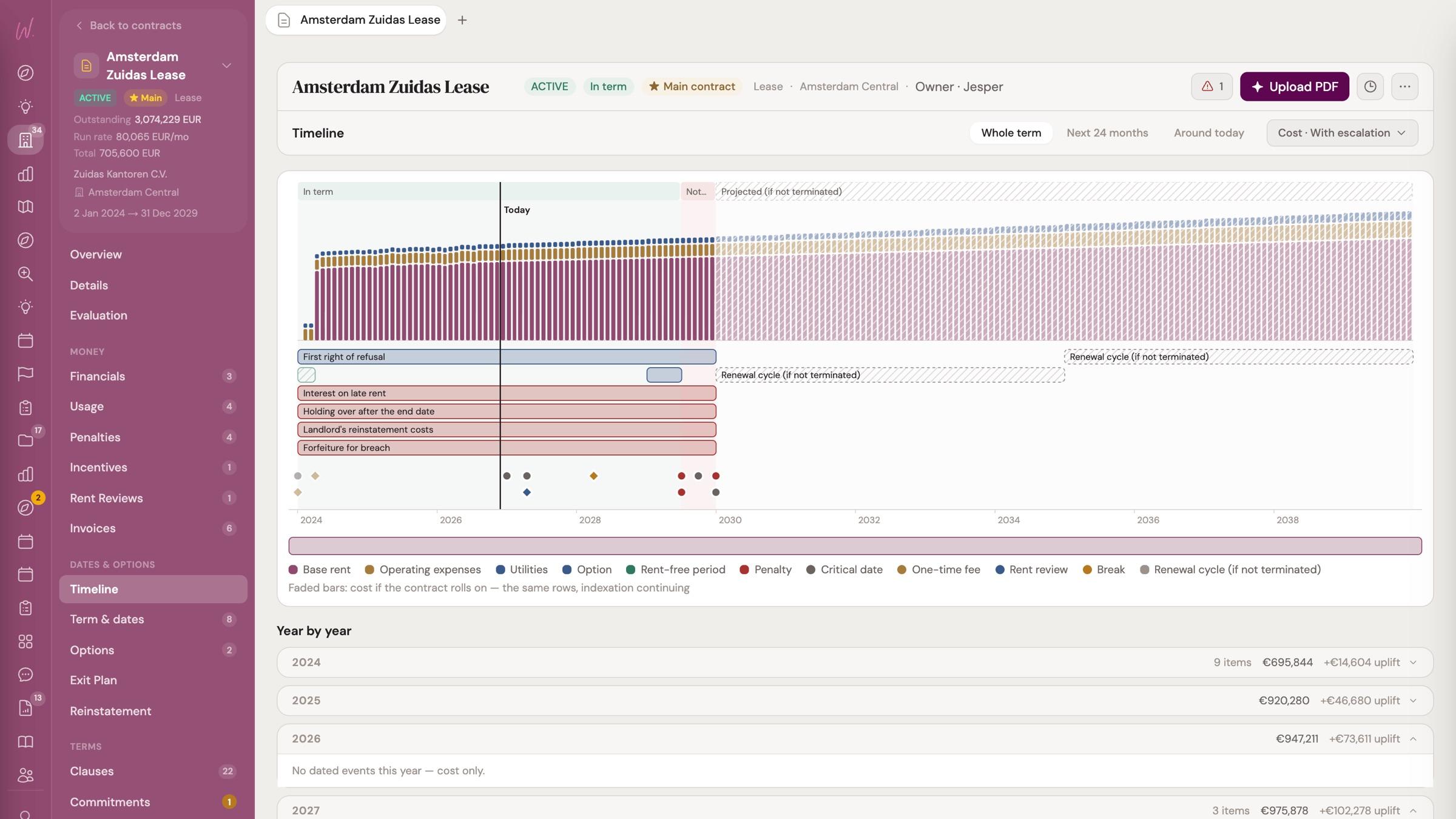
A lease's timeline: cost month by month, options, penalties and dates, on an example company.
- 1ReadAI reads every part and links each term to its clause.
- 2CheckedA person approves it. What the reading doubts comes first.
- 3Rent changesIndexation and reviews, followed as they fall due.
- 4Notice dateCounted down, with a reminder to the owner in time.
- 5Break or renewalThe choice, what each way is worth, and the decision.
- 6Ends or goes onAn amendment joins the same record. Nothing starts over.
Three pillars on the same live data
Each is a module you add to Know. Take one, or all of them.
From a goal to a proven result
Set goals and targets, take up what Workplacer finds in your own data, and run each change until someone has verified what it brought.
- Goals, targets and how much of the gap is covered
- Opportunities found in your contracts, space and costs
- Projects with stages, gates and 80+ tools
Nothing slips through
Every notice date, review and duty has an owner and a reminder in time. Each person sees what is waiting for them.
- Critical dates and site duties, each with an owner
- My Overview, tasks and the year on one schedule
- Invoices checked against what the contract says
Answers and reports from your own records
Ask in your own words and see where the answer comes from. Reports and board packs are written from the same data.
- Ask AI on every page, with its sources
- Quarterly reports with a page for every site, and board packs
- A reporting cycle: what goes out, and when
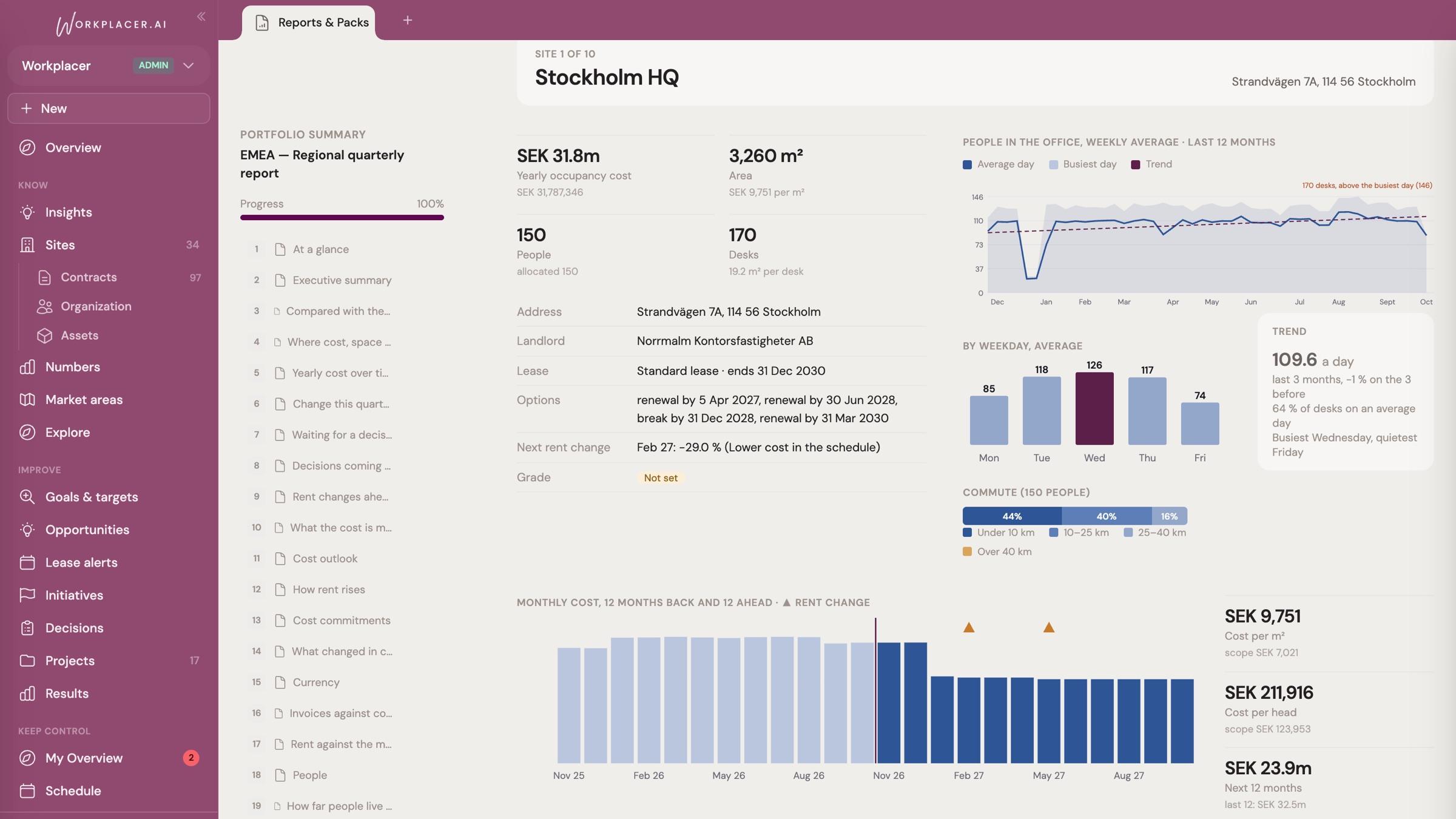
All four together is Workplacer Full. See Workplacer Full
Every change goes through the same funnel
What was found, what was taken up, what was decided, what is in effect and what is verified, in money a year.
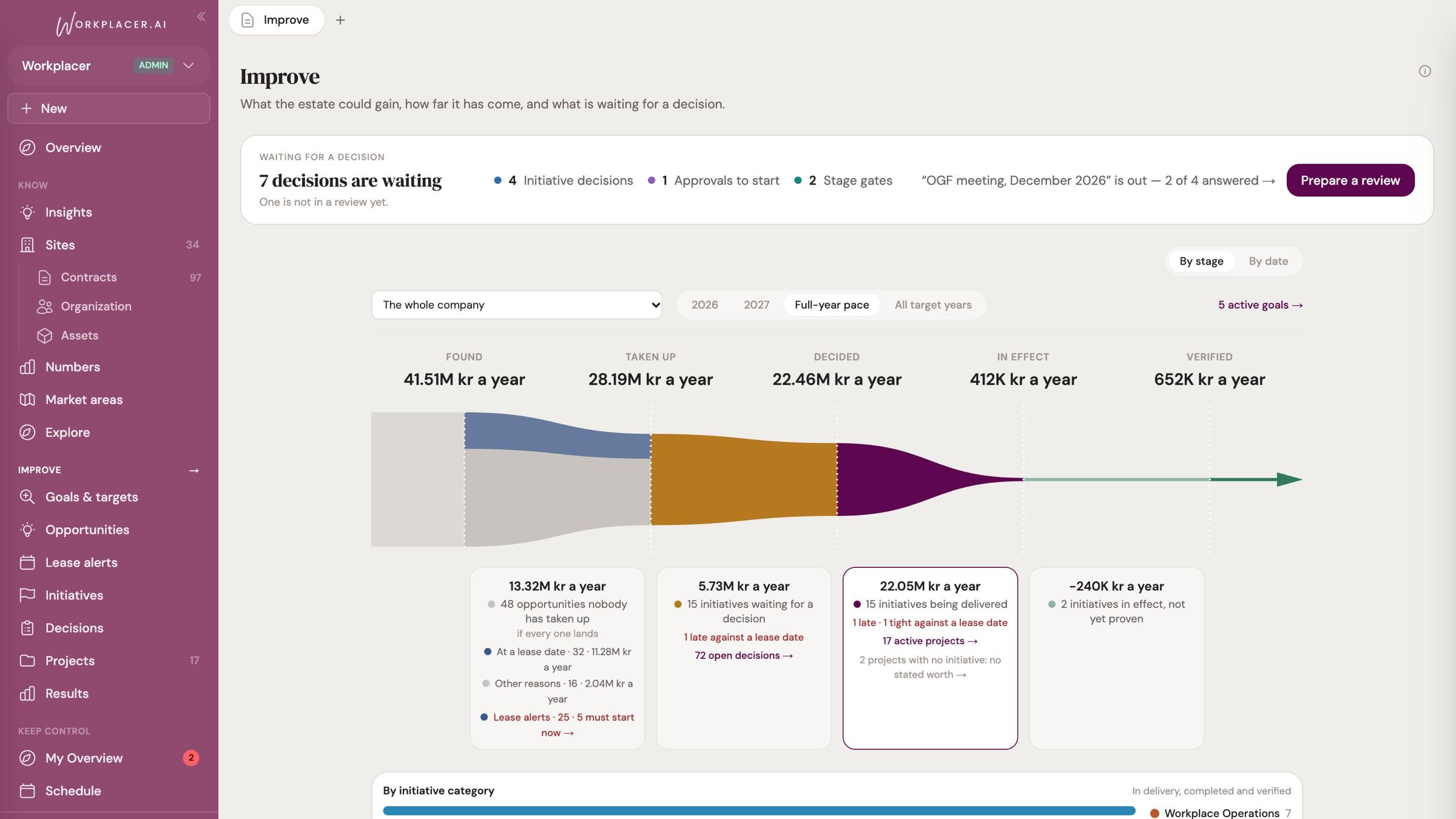
The Improve page, on an example company.
One change, followed all the way
An initiative is the frame around one change: why, what it is worth, who decided, how it was delivered and what it brought. It moves through five states, and the funnel above is every initiative added together.
- Idea
- For decision
- Approved
- In effect
- Verified
- 1GoalOccupancy cost down to SEK 190M a year
- 2OpportunityDublin: one floor of three is half empty
- 3InitiativeGive back one floor, worth SEK 4.2M a year
- 4DecisionApproved, by name and date
- 5DeliveryA project: negotiate, refit, hand back
- 6ResultSEK 4.0M a year, verified against the contracts
Example company. Figures are illustrative.
Every job, step by step
Each page follows one job through every step Workplacer takes: what it reads, what it does and what it hands on.
- Portfolio strategyWhat should the portfolio look like in three years — and is the plan delivering?5 steps
- Business caseWhich alternative, at what cost — and what did we decide?6 steps
- Finding spaceWhere should we be — and which space, on which terms?6 steps
- Space planningHow much space do we need — and which building, floor and brief deliver it?6 steps
- MovesWill everything be ready when people walk in on Monday?7 steps
In their own words
Leaders in real estate, workplace, people and finance on working with Workplacer.

“In Workplacer we are connecting what we already have. One place where the whole portfolio lives, not just as data, but as something the whole team can actually act on.”

“Together with Workplacer, we translated our vision into insights to shape a workplace that supports our culture and strengthens the internal engagement going forward.”

“Together with Workplacer, we laid the foundation for clarifying our future needs. We want our offices to function as a magnetic hub—welcoming and attractive places where people enjoy being, while also bringing us together around goals that drive the business forward.”

“With the insights from Workplacer, we are creating a work environment that will help us achieve even greater impact. A great work environment is the foundation for both wellbeing and performance, and for us that is a top priority.”
Start with the contracts you already have
No implementation project. One lease is enough to begin; add the rest when you are ready.
Upload lease PDFs, point us at a SharePoint folder or forward documents to your inbox address. Exports from HR, badge and finance systems work too.
Every lease is abstracted, every site matched and every date found — you review before anything is saved.
Reminders reach the owner, Ask AI answers with its sources, and projects run from the same data.
Built for heads of real estate, real estate managers, regional and project managers. Who it's for
Connects to what you already use
The files, folders and systems your team already keeps. Nothing has to be migrated first.
Common questions
Most teams are up and running within a day. Upload your contracts, add your sites, and the AI starts extracting immediately. Full portfolio setup with all historical data typically takes 1–2 weeks depending on volume.
See it on your own estate.
A walkthrough on your own contracts with one of the founders, and a straight answer on whether Workplacer fits.